
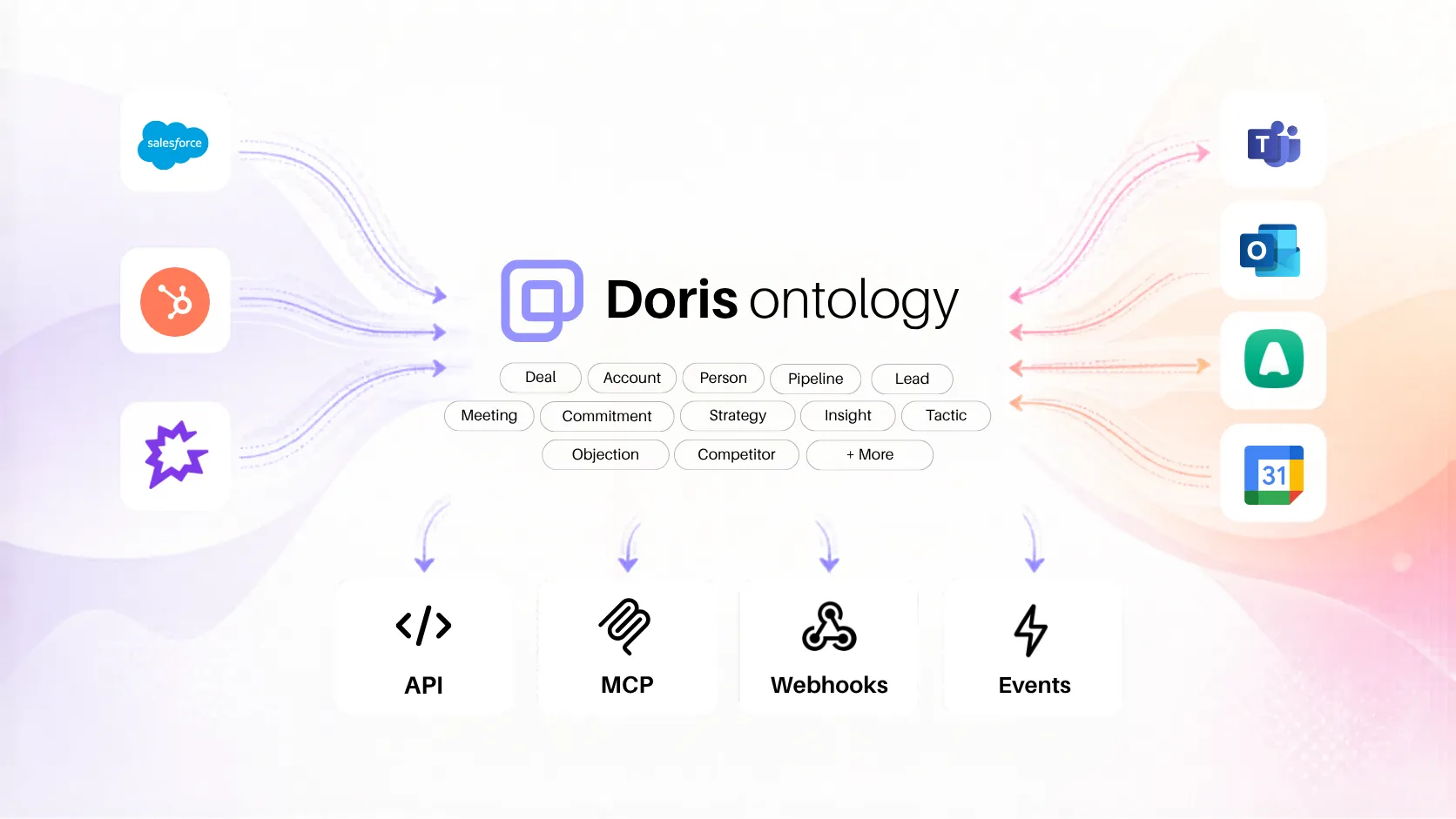
This is the technical companion to Introducing Doris Ontology. If you haven’t read it yet, start there for the product context. This post covers the APIs, event types, code examples, and integration recipes.
REST API
The ontology REST API gives you programmatic access to deals, meetings, commitments, stakeholders, and accounts. Every entity is typed, every relationship is traversable.
Authentication
Generate an API key in the Developer Console (Console → Developer → API Keys). Keys use the sk-live- prefix and support scoped permissions.
curl -H "Authorization: Bearer sk-live-..." \
  "https://server.meetdoris.com/api/v1/ontology/types"
Resolving an Entity
Fetch a single entity by type and ID. Use expand to include related entities inline:
curl -H "Authorization: Bearer sk-live-..." \
  "https://server.meetdoris.com/api/v1/ontology/deal/deal_abc123?expand=stakeholders,commitments"
{
"type": "deal",
"id": "deal_abc123",
"name": "Acme Corp — Enterprise",
"stage": "Negotiation",
"stakeholders": [
{
"type": "stakeholder",
"id": "stk_01",
"name": "Sarah Chen",
"role": "VP Engineering",
"influence": "champion",
"last_interaction": "2026-05-02"
}
],
"commitments": [
{
"type": "commitment",
"id": "cmt_42",
"title": "Send pricing comparison by Friday",
"status": "overdue",
"due_date": "2026-05-02",
"source_meeting": "mtg_789"
}
]
}Available expand keys: stakeholders, commitments, objections, competitors, meetings, strategy, emails, agent_summary, activity, insights
Listing Entities
Paginated list with sort and expand support:
curl -H "Authorization: Bearer sk-live-..." \
  "https://server.meetdoris.com/api/v1/ontology/deal?expand=commitments&sort=-last_activity&limit=25"
Search
Full-text search across all entity types:
curl -H "Authorization: Bearer sk-live-..." \
  "https://server.meetdoris.com/api/v1/ontology/search?q=pricing+comparison&type=commitment"
Batch Resolve
Resolve up to 50 entities in a single call:
curl -X POST -H "Authorization: Bearer sk-live-..." \
  -H "Content-Type: application/json" \
  "https://server.meetdoris.com/api/v1/ontology/batch" \
  -d '{
    "refs": [
      {"type": "deal", "id": "deal_1"},
      {"type": "deal", "id": "deal_2"},
      {"type": "deal", "id": "deal_3"}
    ],
    "expand": ["commitments", "stakeholders"]
  }'
OpenAPI Spec
Auto-generated from the type registry, always current:
https://server.meetdoris.com/api/v1/ontology/openapi.jsonUse this to generate typed client SDKs in any language.
Rate Limits
- 10,000 requests/day per tenant (shared across REST and MCP)
- 300 req/min for resolve, list, and type endpoints
- 120 req/min for search
- 60 req/min for batch
Exceeded limits return 429 with a Retry-After header.
Webhooks
Webhooks let your systems react to events inside Doris in real time. When a meeting finishes processing, a deal moves stages, or a commitment goes overdue — your endpoint gets a signed payload within seconds.
Setting Up
Create webhooks in the Developer Console (Console → Webhooks → Create). Each webhook specifies:
- URL — your HTTPS endpoint
- Event types — glob patterns like
commitment.*,deal.stage_changed,meeting.processed
You can create up to 10 webhooks per tenant.
Events Available Today
| Event | Fires when |
|---|---|
meeting.processed | A new meeting transcript finishes processing |
deal.stage_changed | A deal moves stages in the CRM |
commitment.created | A new commitment is extracted from a conversation |
commitment.overdue | A commitment passes its deadline without resolution |
email.classified | An email is classified and linked to a deal |
Payload Structure
Every webhook delivery follows the same shape:
{
  "event_id": "evt_a1b2c3",
  "event_type": "commitment.overdue",
  "timestamp": "2026-05-05T09:00:00Z",
  "entity": { "type": "commitment", "id": "cmt_42" },
  "data": {
    "title": "Send pricing comparison by Friday",
    "deal": { "type": "deal", "id": "deal_abc123", "name": "Acme Corp" },
    "due_date": "2026-05-02",
    "owner": "Jamie Chen"
  }
}
Security
Every payload is signed with HMAC-SHA256. Verify the X-Doris-Signature header against your webhook secret:
import hmac
import hashlib

def verify_signature(payload_body, signature_header, secret):
    expected = "sha256=" + hmac.HMAC(
        secret.encode(), payload_body, hashlib.sha256
    ).hexdigest()
    return hmac.compare_digest(expected, signature_header)
Delivery & Retries
- Timeout: 10 seconds per delivery attempt
- Retries: 3 attempts with exponential backoff (60s, 5min, 15min)
- Retry task: runs every 60 seconds to pick up pending retries
- Delivery history: visible in Console → Webhooks → select webhook → Deliveries
Testing
Send a test event from the console to verify your endpoint is reachable and correctly processing payloads before subscribing to real events.
MCP (Model Context Protocol)
MCP lets AI tools — Claude, ChatGPT, Cursor, Windsurf, Codex CLI — query the ontology through natural language. No API keys, no custom code. One command to connect, then ask questions.
Setup
Claude Code:
claude mcp add --transport http doris https://mcp.meetdoris.com/mcpClaude Desktop: Add to your MCP config:
{
  "mcpServers": {
    "doris": {
      "command": "npx",
      "args": ["mcp-remote", "https://mcp.meetdoris.com/mcp"]
    }
  }
}
Cursor: Settings → Features → MCP → Add Server → Streamable HTTP → https://mcp.meetdoris.com/mcp
ChatGPT: Developer Mode → Add Connector → https://mcp.meetdoris.com/mcp
Authentication
MCP uses OAuth 2.1 with your existing Doris login. On first connection, a browser popup handles authentication. No API keys to manage.
What You Can Ask
The MCP server exposes 6 tools that mirror the REST API:
ontology_types— list all entity types and their schemasontology_resolve— get a single entity with expand supportontology_list— paginated listing with sort and filterontology_search— full-text search across entity typesontology_batch— resolve up to 50 entities at onceontology_traverse— follow relationships from an entity
In practice, you just ask questions naturally:
“What commitments are overdue on the Acme deal?”
“Show me all meetings with Sarah from Globex in the last month”
“What objections came up in deals that moved past security review?”
“Summarize the strategy and open commitments for my top 5 deals”
The AI client translates your question into the right tool calls automatically.
Cookbook
Slack: Overdue Commitment Alerts
Subscribe to commitment.overdue, post to a deal-specific Slack channel:
@app.route("/webhooks/doris", methods=["POST"])
async def handle_doris_webhook(request):
    event = request.json

    if event["event_type"] == "commitment.overdue":
        deal_name = event["data"]["deal"]["name"]
        channel = f"#deal-{deal_name.lower().replace(' ', '-')}"

        slack.post_message(
            channel=channel,
            text=f"Overdue: {event['data']['title']} (due {event['data']['due_date']})"
        )
Teams: Meeting Summary Cards
Subscribe to meeting.processed. When a meeting finishes, resolve it with expanded commitments and stakeholders, then post an Adaptive Card:
@app.route("/webhooks/doris", methods=["POST"])
async def handle_meeting_processed(request):
    event = request.json

    if event["event_type"] == "meeting.processed":
        meeting_id = event["entity"]["id"]

        meeting = requests.get(
            f"https://server.meetdoris.com/api/v1/ontology/meeting/{meeting_id}"
            "?expand=commitments,stakeholders",
            headers={"Authorization": f"Bearer {API_KEY}"}
        ).json()

        teams.post_adaptive_card(
            channel=DEALS_CHANNEL,
            title=meeting["title"],
            summary=meeting["summary"],
            commitments=meeting["commitments"],
            attendees=meeting["stakeholders"]
        )
n8n: Closed-Won to Project Kickoff
- Trigger: Webhook node receiving
deal.stage_changed - Filter: IF node checking
data.new_stage == "Closed Won" - Fetch: HTTP Request node resolving the deal with
expand=commitments - Create: Linear/Asana node creating a project with each open commitment as a task
- Notify: Slack/Teams node alerting the CS team with the deal summary
GPT/Claude: Deal Prep Agent
Build an agent that preps reps before calls. When a rep asks “Prep me for my 2pm with Acme,” the agent:
- Resolves the deal with
expand=stakeholders,commitments,meetings,strategy - Pulls the last 3 meetings and open commitments
- Checks for overdue items
- Assembles a 30-second brief
All through MCP — no custom API code required. The agent queries the ontology the same way a human would browse the app.
Custom Dashboard: Commitment Follow-Through
Pull all active deals, calculate commitment follow-through rates per rep and per stage:
curl -H "Authorization: Bearer sk-live-..." \
  "https://server.meetdoris.com/api/v1/ontology/deal?expand=commitments&sort=-last_activity&limit=50"
For each deal, count commitments by status (pending, completed, overdue, auto_closed) and calculate the follow-through rate. Aggregate by rep or by pipeline stage for your BI tool.
Getting Started
REST API — Generate an API key in Console → Developer → API Keys. Start querying immediately.
Webhooks — Console → Webhooks → Create. Choose events, point at your endpoint, send a test event.
MCP — One command: claude mcp add --transport http doris https://mcp.meetdoris.com/mcp
Full documentation at docs.meetdoris.com.